Transaction Log
Last updated: 6/17/2026
The transaction log tracks every transaction made through your business units.
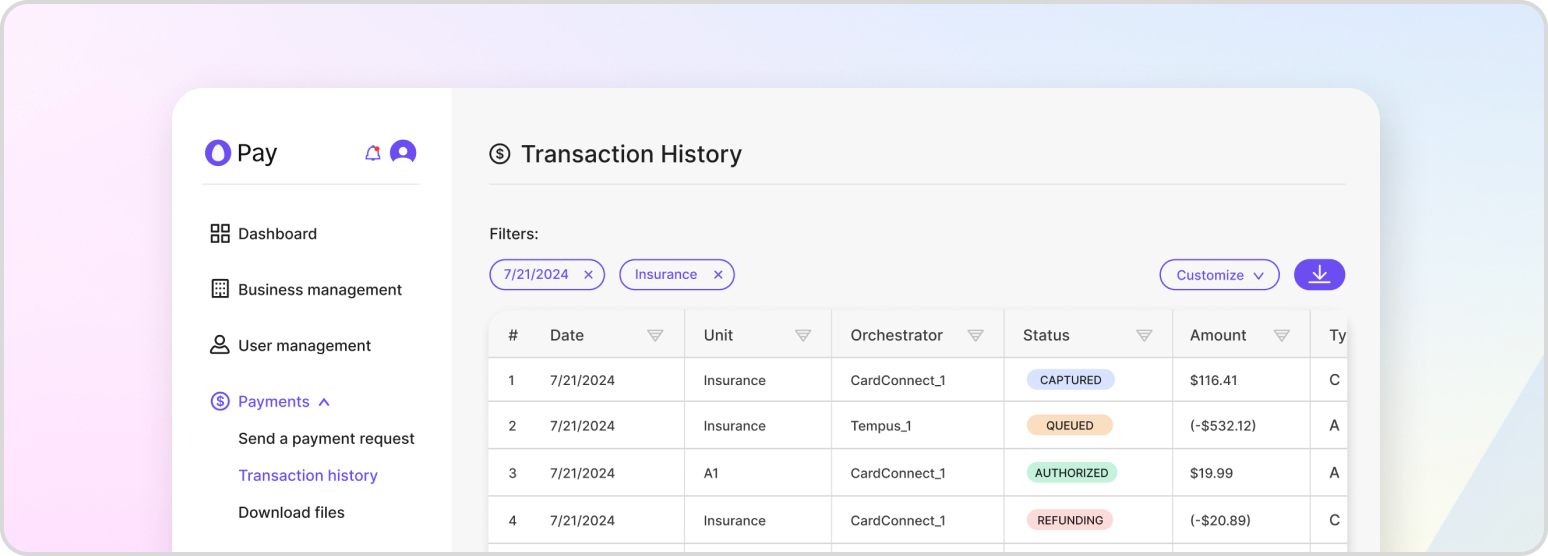
The transaction log records every transaction processed through any payment orchestrator in your business units. It is the first place to look when verifying a transaction’s status or investigating a customer’s payment issue.
Viewing Transactions
In the tenant console, open the “Payment History” page. You can filter the table by date and merchant to narrow down the transaction you are looking for. Through the API, transactions can be listed with GET /v1/payment-proxy/transactions, retrieved by id with GET /v1/payment-proxy/transactions/{transaction_id}, or looked up by their short reference with GET /v1/payment-proxy/transactions/ref/{shorthand_ref_id}.
Transaction Statuses
A transaction moves through a series of statuses as it is processed. The most common are:
PENDING— created but not yet authorized.AUTHORIZED— funds held but not yet captured.CAPTURED— funds settled to the merchant.VOIDED,FULL_VOID, orPARTIAL_VOID— an authorization was cancelled before capture.FULL_REFUNDorPARTIAL_REFUND— captured funds were returned.- The corresponding
*_FAILEDstates when an operation does not succeed. RECONCILIATION_REQUIRED— the outcome is uncertain and is being verified.
Modifying a Transaction
From the “Payment History” table you can act on a transaction directly — selecting “Void” to cancel an authorization or “Refund” to return captured funds. These actions cannot be reversed. The equivalent API operations are documented in Void a Payment and Refund a Payment.
Exporting Transaction Data
From the Payment History page you can export transactions for analysis. Use the “Export” dropdown to download the data as JSON, CSV, or TXT.